
Learn how to pinpoint which products have a negative sales trend and understand the reasons behind it, so you can act with confidence.
Before Getting Started
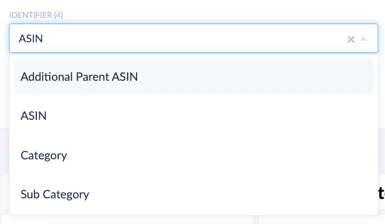
This use case uses the Analyzing Product Performance (Vendor) dashboard, where you can analyze performance at ASIN, parent ASIN, subcategory, and category level.
Ways to Analyze Your Data
-
ASIN level — dive into the performance metrics of each ASIN individually: sales trends, reviews, and pricing dynamics for precise insight into product performance.
-
Category level — compare the performance of ASINs within the same category to identify top performers, emerging trends, and areas for improvement.
-
Subcategory level — drill down further to uncover niche opportunities, assess market saturation, and fine-tune product strategies based on granular insight.
Selecting the right time frame and KPI columns
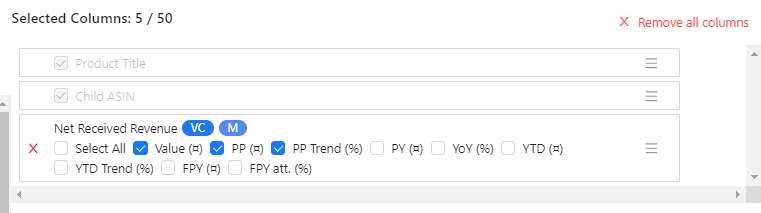
In Product Performance you can select a specific time frame — a week, a month, or a year — and choose the KPIs you want to see in the Columns selector. For example, to find which ASINs are responsible for a decrease in revenue, add Net Received Revenue (Value, Previous Period, and Trend). The chart below the table then shows you which ASINs have the biggest negative trends. For a more detailed analysis you can add further KPIs such as Ad Sales, Ordered Revenue, Ordered Units, and Customer Returns.
7-Step Analysis Guide
-
Evaluate Ordered Revenue. Examine your ordered revenue over a period — the total value of orders placed by customers. A decrease indicates a drop in demand.
-
Assess Net Received Revenue. This is the revenue you receive after Amazon deducts fees and commissions. A decline suggests either lower sales volume or reduced prices.
-
Analyze product performance. Identify ASINs with declining sales trends and compare against historical data. Look for changes in demand, the competitive landscape, or product visibility.
-
Review pricing strategy. Check whether recent price changes hurt sales, and run a competitive pricing analysis. Also check your Buy Box percentage to see whether you lost the Buy Box to a cheaper competitor.
-
Monitor reviews and ratings. Poor reviews can significantly impact sales. Address quality issues or customer concerns promptly.
-
Examine marketing efforts. Review advertising campaigns, promotions, and visibility strategies. Check the "Ad Sales Share" KPI to understand whether you are overspending on ads for a specific ASIN.
-
Consider external factors. Seasonality, changes in consumer behavior, or macroeconomic trends can all influence sales performance.