
If you're looking to link your advertising account, here's how to connect to the Amazon Advertising API.
How to connect the Advertising API
Step 1: Make sure you are not logged into any Amazon advertising account
First of all, make sure that you are not logged into an Amazon advertising account with the browser you are currently using. To do this, go to the Amazon Advertising Console and log out if needed.
Step 2: Connect your emax digital account with the Advertising API
Log in with an emax digital user account and select the company account you want to connect.
Go to Administration → Data Connections.
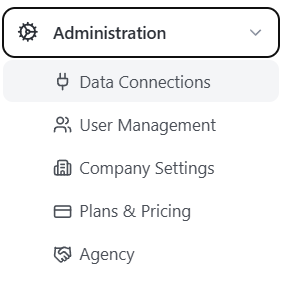
Click Manage in the Advertising Connections section, then click Authorize Amazon Advertising.

Click Confirm to authorize the emax digital app to access your advertising data.
Step 3: Select the Advertising Profiles you want to connect
After you confirm, the drawer will display all advertising profiles you have access to.
Important: In some cases (e.g. in the URL) the "A" is substituted by "ENTITY". So "A123456" is the same ID as "ENTITY123456".
Select the advertising profiles you want to connect using the checkbox and click Save.
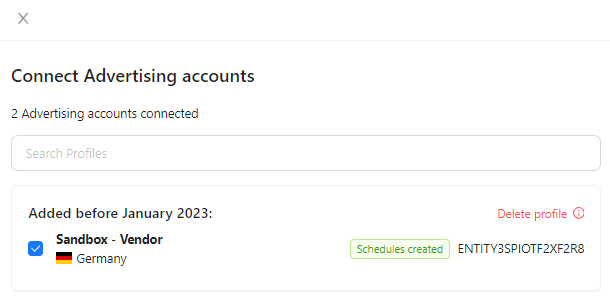
Your advertising profiles are now connected. Your advertising data will be available within 72 hours.
For details on advertising data scope and refresh timing, see Amazon Advertising (SPA) — Data Scope and Update Frequency (Reference and Data). For managing or restoring connections, see Managing Data Connections (Setup and Configuration → Administration).
💡 Do you think the content on this page needs improvement? Let us know at support@emax-digital.com