
The emax digital navigation has moved to the left side of the screen. The sidebar gives you quick access to all sections of the app and stays visible as you move between dashboards. Click any section to open it, and use the arrow to collapse or expand the sidebar for more screen space.
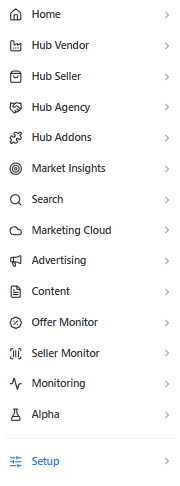
Sections in the sidebar
-
Home — your starting point with overview dashboards and Key Insights.
-
Hub Vendor — sell-in performance dashboards for your Vendor Central data.
-
Hub Seller — sell-out performance dashboards for your Seller Central data.
-
Hub Agency — agency-level overview across multiple brand accounts.
-
Hub Addons — additional Hub modules included in your package.
-
Market Insights — Amazon search visibility and Share of Voice for your brand and competitors.
-
Search — search and explore your product and ASIN data.
-
Marketing Cloud — AMC dashboards for advanced attribution and audience analysis.
-
Advertising — Sponsored Ads (SPA) and DSP campaign performance dashboards.
-
Content — content monitoring for your product detail pages.
-
Offer Monitor — tracking of offers and Buy Box data across your catalog.
-
Seller Monitor — seller-specific monitoring dashboards.
-
Monitoring — continuous tracking of availability, content, and pricing on your product detail pages.
-
Setup — data connections, catalogs, and account configuration.
Breadcrumb navigation
At the top of every page you'll see a breadcrumb trail showing exactly where you are in the app — for example: emax digital › Setup › Vendor Central Catalog. Click any item in the breadcrumb to jump back to that level.

Which sections are visible depends on your emax digital product package. If you expect a section but don't see it, contact your customer success manager.
💡 Do you think the content on this page needs improvement? Let us know at support@emax-digital.com