
How to get there: Open the Content Monitor → click Edit Content Score

The Content Score is emax digital's internal scoring system for your Amazon product detail page content. It calculates how well each of your ASINs is set up based on criteria and thresholds you define — and is used purely within emax digital for prioritization and trend tracking. It does not connect to Amazon, push data, or compare against anything on the live PDP.
The final score is calculated as a percentage of achieved points out of the total possible points across all active criteria. Points reflect the relative importance you assign to each criterion — if title length is twice as important as bullet points for your brand, give it twice the points.
The Setup Screen
When you open Edit Content Score, you land on the Setup tab. A History tab is also available to see previous benchmark configurations. Click Save in the top right corner to apply any changes.
The page description explains the logic:
Customize how your products' content score is calculated by adjusting ranges and points for the following criteria or by turning them off completely. Points symbolize how a specific criterion's importance is weighted, so if one is twice as important as another, assign twice as many points. Descriptions achieve maximum points if A+ content is present. The final score will be calculated as a percentage of achieved points out of the maximum amount.
Criteria that are greyed out are inactive for your account type (e.g. Book Title and Book Description apply only to book catalogues).
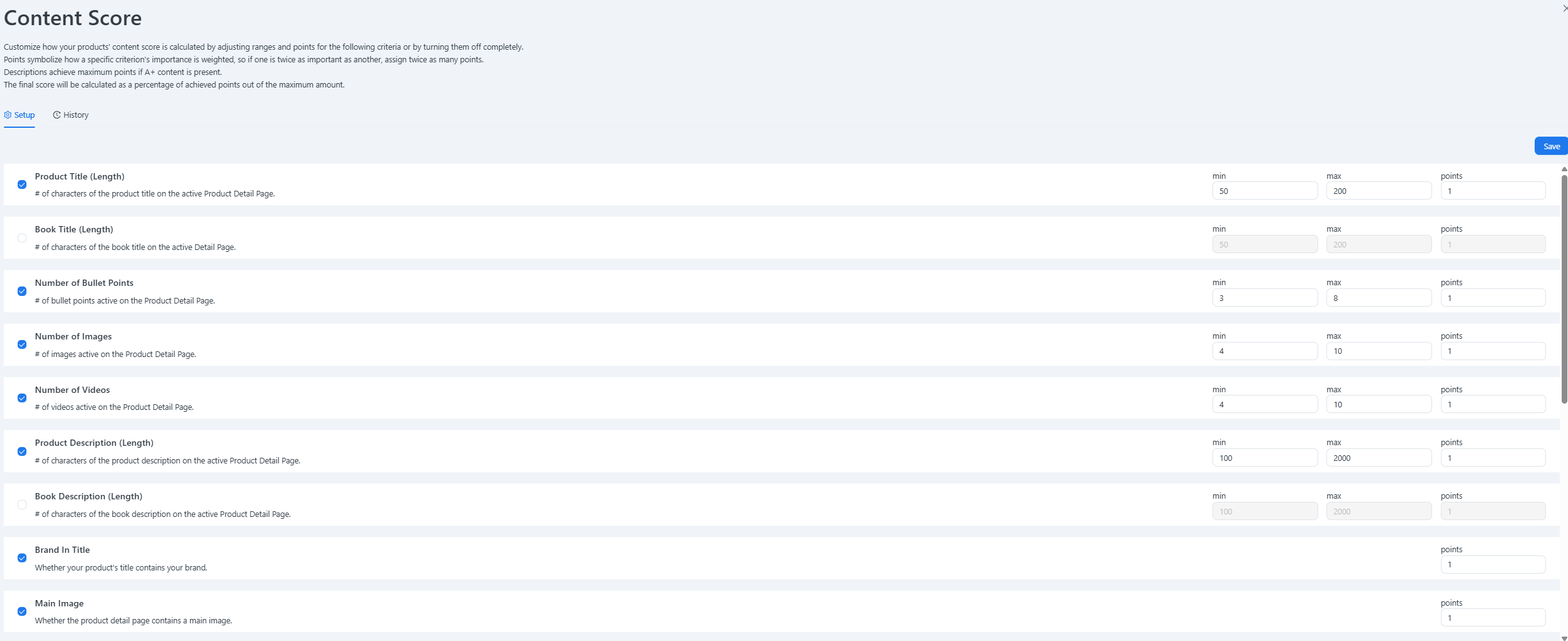
Configurable Criteria
Range-Based Criteria
For these criteria, set a minimum and maximum value. An ASIN earns the full points for that criterion when its value falls within the defined range.
|
Criterion |
What is measured |
Default min |
Default max |
Default points |
|---|---|---|---|---|
|
Product Title (Length) |
# of characters of the product title on the active PDP |
50 |
200 |
1 |
|
Book Title (Length) |
# of characters of the book title on the active PDP |
50 |
200 |
1 |
|
Number of Bullet Points |
# of bullet points active on the PDP |
3 |
8 |
1 |
|
Number of Images |
# of images active on the PDP |
4 |
10 |
1 |
|
Number of Videos |
# of videos active on the PDP |
4 |
10 |
1 |
|
Product Description (Length) |
# of characters of the product description on the active PDP |
100 |
2,000 |
1 |
|
Book Description (Length) |
# of characters of the book description on the active PDP |
100 |
2,000 |
1 |
Presence-Based Criteria
For these criteria, there is no min/max — an ASIN earns the points simply if the element is present on the PDP. Assign points based on how important the element is to your content strategy.
|
Criterion |
What is measured |
Default points |
|---|---|---|
|
Brand In Title |
Whether your product's title contains your brand name |
1 |
|
Main Image |
Whether the product detail page contains a main image |
1 |
Tips for Setup
-
Start with the defaults. The default values are a solid starting point. Run the score for a few weeks before making adjustments so you have a baseline to compare against.
-
Use points to reflect priority. If A+ Content is critical to your conversion rate, set it to 2 or 3 points while leaving lower-priority criteria at 1. The score will weight accordingly.
-
Turn off irrelevant criteria. If your catalogue has no books, disable Book Title and Book Description so they don't appear in your Content Audit table.
-
Check History after changes. The History tab lets you review past configurations — useful when a score shift needs to be explained to a stakeholder.
Where the Content Score Appears
Once configured, the score is visible in:
-
🔭Content Audit — portfolio trend and per-ASIN breakdown with a pass/fail view of every criterion
-
Content Monitor — per-ASIN score alongside your master content data
💡 Do you think the content on this page needs improvement? Let us know at support@emax-digital.com