
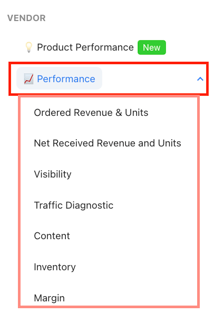
App location: Hub → Vendor → Performance (app.emax-digital.com/performance-summary-hub-vendor)
Overview
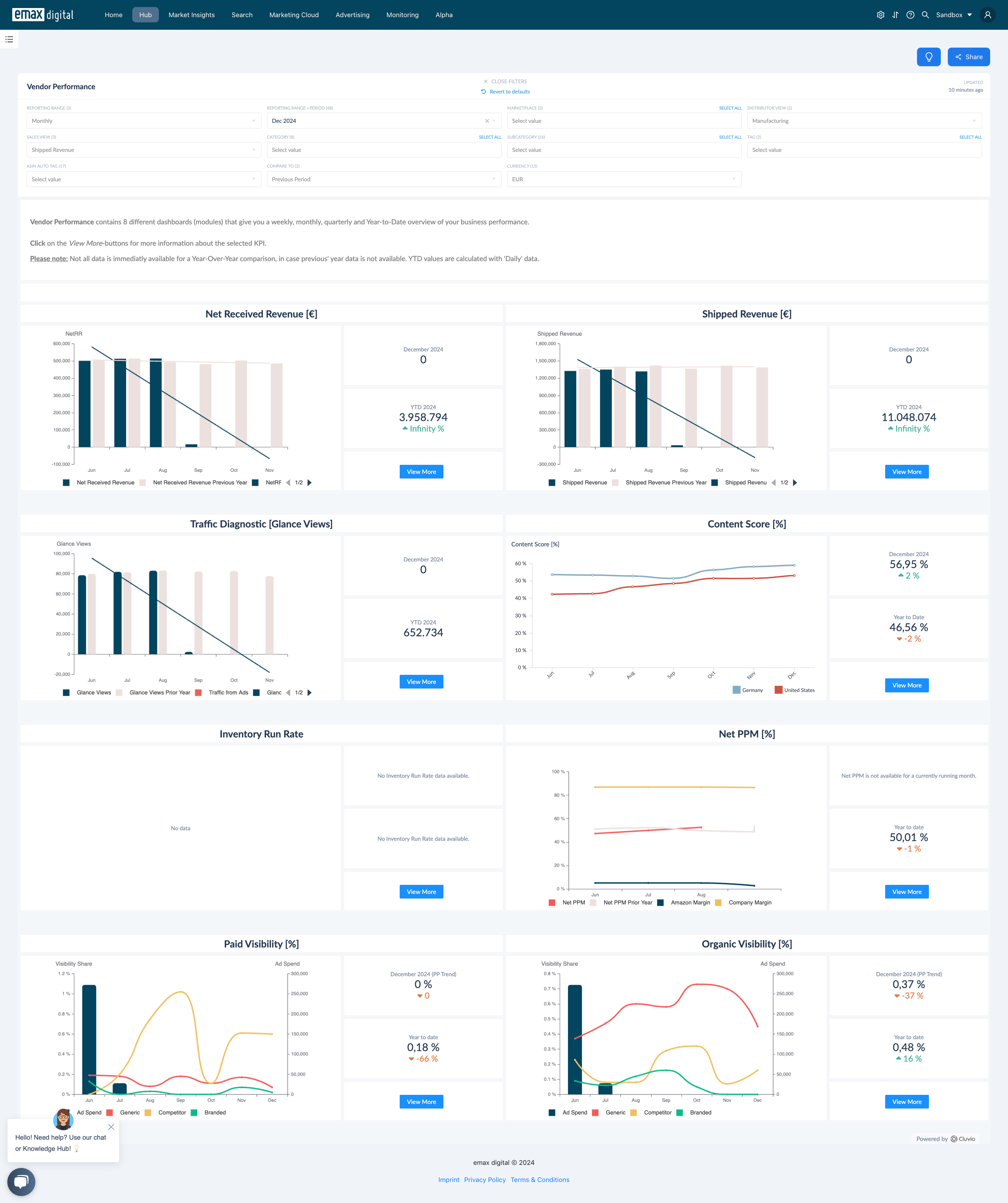
The Performance Summary Hub — Vendor is the core of the Hub for Vendor Central brands. It gives you an account-level overview of your most important KPIs and lets you drill down into the underlying reporting levels for weekly and monthly insight. It is built to answer the three questions every vendor manager asks at the start of the week:
-
What happened last week or last month in my Amazon business?
-
What are the driving factors behind the growth or decline?
-
Was it traffic or conversion? Missing inventory, or strong content that boosted sales?
From this summary you can move into each dedicated dashboard to investigate a single metric area in depth.
Dashboards in this Section
The Performance Summary Hub groups the following per-metric dashboards. Each has its own page with full detail on metrics, filters, use cases, and limitations:
-
Ordered Revenue and Units (Vendor) — sell-out demand: what customers ordered, with year-over-year trends and customer returns. Drill down to ASIN level by week or month.
-
Net Received Revenue and Units (Vendor) — sell-in: what Amazon received from you (net of returns), with the correlation between Net Received Revenue and inventory levels.
-
Traffic Diagnostic (Vendor) — 12-month traffic development with YoY comparison, advertising-sourced traffic by campaign type, and a detailed table of page views, conversion rate, and ad spend.
-
Inventory (Vendor) — stock health: stock categories, run rate, unhealthy units, and a full per-ASIN detail table with forecast coverage.
-
Profits and Margin Overview (Vendor) — Net PPM, Amazon Margin, and Company Margin trends over time.
-
Visibility (Vendor) — organic and paid search visibility for your tracked keywords, segmented into Branded, Generic, and Competitor.
-
Bestseller Rank Analysis (Vendor) — bestseller rank development for your catalogue.
What Each Metric Area Covers
Net Received Revenue and Units
Track revenue growth versus the previous year alongside year-over-year trends, and see the correlation between Net Received Revenue and inventory levels in one chart. All KPIs are summarised in a downloadable table, and you can navigate to a specific month or week and drill down to the ASIN level for detailed analysis.
Ordered Revenue and Units
Track sales versus last year and spot trends over time, including customer returns. A chart shows sales for the past 12 months versus the previous year, alongside a downloadable summary table. Click a specific month or week to access individual product data.
Traffic Diagnostic
Explore traffic in depth: a chart of the past 12 months' traffic development with year-over-year comparison and key KPIs; a breakdown of traffic sourced from advertising by campaign type over 12 months; and a detailed table showing monthly page views, YoY and previous-period trends, conversion rate with its trend, and ad spend.
Content
Evaluate the quality and progression of your detail-page content across product title, bullet points, images, product description, A+ Content, A+ Comparison Table, brand story, brand store link, and video. You can customise the point system and benchmarks in the Content Score dashboard within your admin settings.
Inventory
Get a complete view of your Vendor account's logistics: products categorised as sufficient (run rate > 7 days), low (3–7 days), critical (< 3 days), or out of stock (inventory level = 0); a table covering sales speed, vendor lead time, inventory level, unhealthy units, open purchase order quantities, and glance views; and a graph tracking unhealthy units over the past 12 months versus the previous year. Hover over the table and click the info icon for KPI definitions.
Margin
Monitor how Net PPM compares to the previous year and track Amazon Margin and Company Margin trends. The chart visualises Net PPM and Company Margin over the past 12 months (or weeks) versus the prior year, with a downloadable KPI table and click-through to ASIN-level detail.
-
Net PPM = (Product Revenue − Product COGS − Vendor Funded Coop) ÷ Product Revenue
-
Amazon Margin = (Total Revenue − Net Received Revenue) ÷ Total Revenue
-
Company Margin = (Net Received Revenue − Fixed Cost) ÷ Net Received Revenue
Visibility
The visibility charts (paid and organic) illustrate how search visibility for your predefined generic, branded, and competitor keywords evolves alongside advertising spend. Click "View More" to explore the number of tracked keywords and their presence in search results. Visibility on keyword level requires that you have uploaded keywords under Setup → Monitoring Configuration → Managing Tracked Keywords.
📌 Tip: Start at this summary to spot which metric area moved, then open the dedicated dashboard for that area to find the driver at ASIN, category, or marketplace level.
Migration note (Phase 1b): Written from the legacy Vendor Analytics page "Vendor Performance" (1667366981) as the section overview for the Performance Summary Hub — Vendor. Content reproduced and structured; reproduced, not yet optimised or fact-checked. Two source images embedded via external URL — intern to verify they render and re-upload if broken. Internal links to be confirmed in the redirect/relink pass. Flagged for the later optimisation phase.