
Sometimes Amazon removes or expires the authorization that allows emax digital to access your Sponsored Ads data. When this happens, you might notice missing data in dashboards or reports. The fix only takes about 2 minutes.
Please do NOT disconnect the ads profiles first. Just follow the instructions below to re-authorize your connected accounts. If you disconnect your profiles first, that might lead to data loss.
Step-by-step instructions
Step 1 — Go to your Data Connections page in emax digital
-
Log in to emax digital.
-
Navigate to Setup → Data Connections.
Step 2 — Reauthorize your Amazon Ads account
-
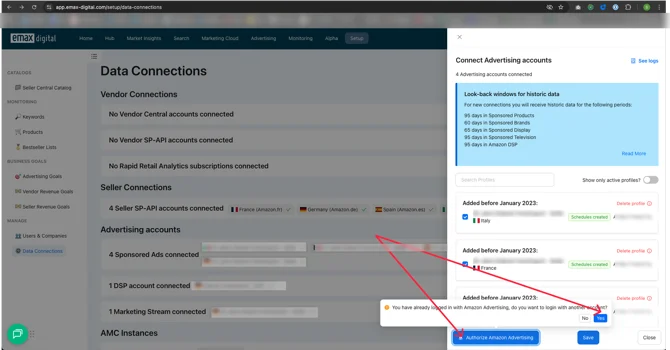
Hit "manage" for Amazon Sponsored Ads connections.
-
Click Authorize Amazon Advertising and hit "yes".
-
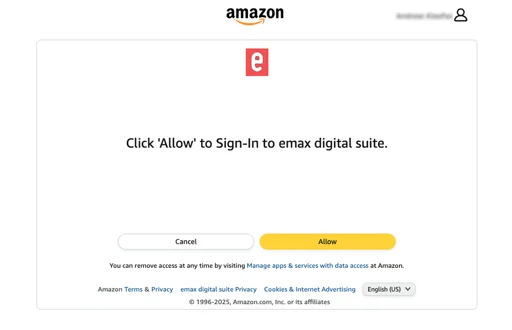
You'll be redirected to an Amazon website. Log in with the Amazon account that manages your ads.
-
Confirm access by clicking Allow.
Done!
Your data connection is now active again. Within a few minutes, your campaign performance will appear in emax digital as usual.
If you still don't see data after 30 minutes, or you receive any error message, reach out to our support team at support@emax-digital.com — we're happy to help.