
Find out how to analyse your Bestseller Rank.
Bestseller Rank Analysis Vendor & Bestseller Rank Analysis Seller
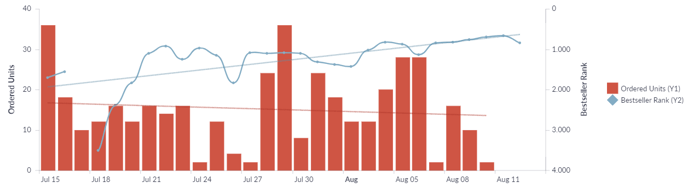
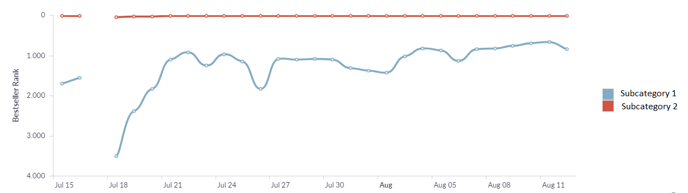
With our Bestseller Rank Analysis Dashboard, you can compare your Bestseller Rank with your Ordered Units and see how the KPIs have developed over time. Plus, you can compare your Bestseller Rank in different Subcategories on an ASIN-Level.
1. Access the Dashboard
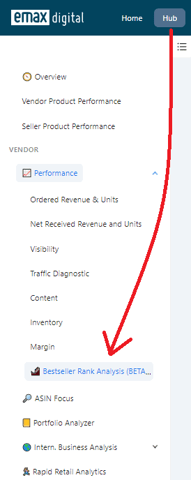
You can access the Bestseller Rank Analysis Dashboard in Hub -> Vendor / Seller -> Performance
2. Apply Filters
Use filters like Time Range, Marketplace, and ASIN to refine your view.
Additional Filter Settings in this Dashboard:
- Aggregation: Determine how detailed the chart should be.

3. How to use the Bestseller Rank Analysis Dashboard
-
In the first chart, you can compare your Bestseller Rank (blue graph) with your Ordered Units (red columns) and see how both KPIs have developed over time.
-
In the second chart, you can compare your Bestseller Rank in different Subcategories on an ASIN-Level. (You have to choose an ASIN fist)
4. When to use the dashboard
-
If you want to know how much sales you have to make in order to appear in the Bestseller Rank.
-
To notice the following Cases:
Case 1 : Sales go up but rank goes down = Your competitions sales / the sales in the category are increasing faster than your sales
Case 2 : Sales go down but rank goes up: competitions sales / sales in this category are decreasing faster than your Sales
Case 3 : Sales go down but rank goes up: Other sellers are making the sales -> check your buy box and the emax seller monitor on who you lost the buybox to
🏷️ Tags: keywords-visibility · walkthrough · seller · bestseller