
What are virtual bundles on Amazon?
The Virtual Product Bundles program lets you create product bundles for a unified selling experience on Amazon. It is designed to support your sales and visibility on the platform.
Here are some strategies to make the most of this program:
-
Bundle basics: Create bundles with 2–5 ASINs to save on shipping costs. Amazon allows flexibility, letting you design packages as you see fit.
-
Amazon's rules: Follow Amazon's bundle policy. Stick to a single category, ensure each product is purchasable individually, and avoid using generic items.
-
Smart pairings: Choose complementary products often purchased together. Keep a similar price point to make your bundles attractive. (You can also use the Market Basket Analysis to discover which categories or specific products tend to sell well together.)
-
Discount delights: Offer attractive discounts to grab customers' attention.
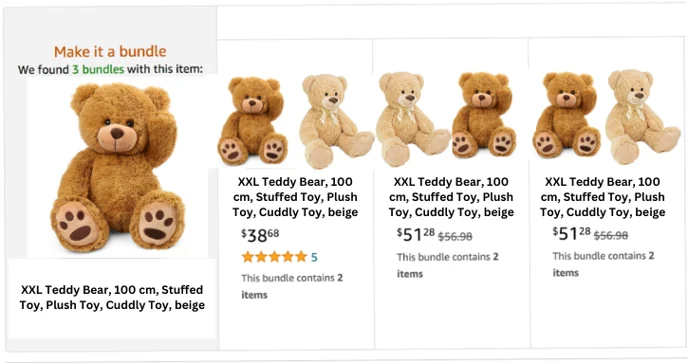
Virtual vs. physical bundles
Virtual bundles
-
Nature: Products are related but not physically bundled together; no changes to physical packaging or product arrangement.
-
Presentation: Customers can add all items to their cart with a few clicks, but products remain physically separate.
-
Creation: Configured digitally on the platform.
-
Logistics: Each item may have individual tracking, depending on shipping methods. Products are shipped individually.
Physical bundles
-
Nature: Involves physically bundling products together; requires changes to physical packaging and product arrangement.
-
Presentation: Products are packaged and shipped together as a single unit.
-
Creation: Requires physical handling and packaging.
-
Logistics: Typically tracked as a single unit with a single tracking number. Products are packaged together.
In summary, virtual bundles are digitally configured groups of related products without physical changes, allowing individual tracking. Physical bundles involve physical bundling, presenting a unified package to customers and typically having a single tracking number. The choice depends on your logistical preferences and the customer experience you want to provide.
Creating virtual bundles
Amazon Vendor Central
-
Overview: Virtual bundles on Vendor Central let you group related products without physical bundling.
-
Process: Contact Amazon Vendor Support for assistance in setting up these bundles.
-
Benefits: Cross-promote complementary products and enhance your average order value.
Amazon Seller Central
-
Access: In Seller Central, go to Brands → Virtual Bundles.
-
Creation: Craft virtual bundles to increase sales and improve your conversion rate.
💡 Do you think the content on this page needs improvement? Let us know at support@emax-digital.com