
1. Where to find the Key Insights board
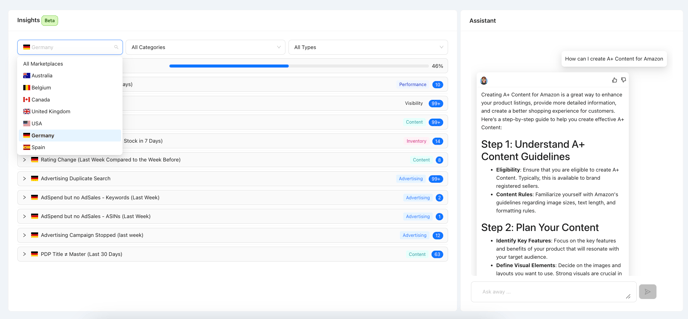
2. What is the Key Insights Board?
a. Available Insights
b. Action Steps for Insights
3. Chat with Emma for general Amazon Insights
Please note that the dashboard is currently in beta, and your feedback is invaluable as we continue to improve and refine the experience.
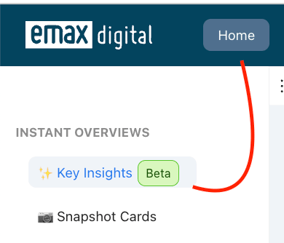
1. Where to find the Key Insights board
You can find the Key Insights Board on the right-hand side of the new Home Section of the emax tool.
**
2. What is the Key Insights Board?**
The Key Insights give you a quick overview of the key topics of your Amazon business. Here, you'll be informed about events that require your attention, and you'll have the opportunity to access details via the emax tool and take immediate action.
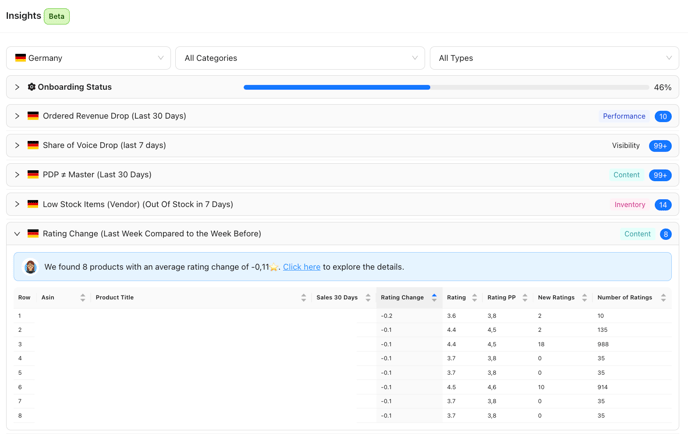
a. Available Insights
|
Category |
Type |
Meaning |
Interval |
Merchant Type |
|---|---|---|---|---|
|
Performance |
Ordered Revenue Drop (Last 30 Days) |
Your achieved ordered revenue [M] for the past 30 days is more than 50% lower than in the same period prior. |
Rolling, last 30 days vs. previous 30 days. |
Vendor |
|
Performance |
Sales Drop (Last 30 Days) |
Your achieved sales in the past 30 days are more than 50% lower than in the same period before. |
Rolling, last 30 days vs. previous 30 days. |
Seller |
|
Visibility |
Share of Voice Drop (Last Week) |
Your share of voice in the past week was 50% lower than in the same period prior. |
last week compared to the week before. |
Vendor & Seller |
|
Product Health |
Status Change |
The status of your product detail page has changed. Status can be buyable, discoverable, or deleted. |
|
|
|
Amazon Documentation -> https://developer-docs.amazon.com/sp-api/docs/notification-type-values#listings_item_status_change |
real-time |
Seller |
|
|
|
Product Health |
Detail Page Offline |
Your product detail page has been deleted. |
real-time |
Seller |
|
BuyBox & Price |
Low BuyBox Share (Seller) (Current Status) |
Your BuyBox share for the listed items was less than 90% in the past week. |
last week compared to the week before. |
Seller |
|
BuyBox & Price |
BuyBoxPrice < RRP (Last Week) |
The BuyBox price in the past week was less than 30% of the recommended retail price. |
last week compared to the week before. |
Vendor & Seller |
|
BuyBox & Price |
Low BuyBox Share (Vendor) (Current Status) |
Your BuyBox share for the listed items was less than 90% in the past week. |
last week compared to the week before. |
Vendor |
|
BuyBox & Price |
Lost BuyBox (Last Week Compared to the Week Before) |
Since the last check, you've lost the BuyBox for the listed items. |
last week compared to the week before. |
Vendor & Seller |
|
Inventory |
Low Stock Items (Vendor) (Out Of Stock in 7 Days) |
Assuming the sales speed of the past 7 days, the listed items will run out of stock within the next 7 days. |
daily |
Vendor |
|
Inventory |
Low Stock Items (Seller) (Out Of Stock in 7 Days) |
Assuming the sales speed of the past 7 days, the listed items will run out of stock within the next 7 days. FBM & FBA are aggregated. |
daily |
Seller |
|
Content |
Low Content Score (Current Status) |
The live content score for the listed items is below 50%. |
last week compared to the week before. |
Vendor & Seller |
|
Content |
PDP ≠ Master (Last 7 Days) |
During the last check, discrepancies between PDP and master content were found for at least one content element. |
last week compared to the week before. |
Vendor & Seller |
|
Content |
Rating Change (Last Week Compared to the Week Before) |
The average product rating for the listed items has changed. |
last week compared to the week before. |
Vendor & Seller |
|
Advertising |
AdSpend but no AdSales - Campaigns (Last Week) |
The ad spend for the listed campaigns is higher than 10 EUR, but sales are 0. |
daily |
Vendor & Seller |
|
Advertising |
AdSpend but no AdSales - ASINs (Last Week) |
The ad spend for the listed ASINs is higher than 10 EUR, but sales are 0. |
daily |
Vendor & Seller |
|
Advertising |
AdSpend but no AdSales - Keywords (Last Week) |
The ad spend for the listed keywords is higher than 10 EUR, but sales are 0. |
daily |
Vendor & Seller |
|
Advertising |
AdSpend but no AdSales - Targets (Last Week) |
The ad spend for the listed targets is higher than 10 EUR, but sales are 0. |
daily |
Vendor & Seller |
|
Advertising |
Campaign stopped |
The listed campaigns have been stopped. |
daily |
Vendor & Seller |
|
Advertising |
AdSpend Optimization Opportunity |
The listed ASINs are actively advertised despite having high organic traffic. |
daily |
Vendor & Seller |
**b. Action Steps for Insights
**
Performance
1. Ordered Revenue Drop (Last 30 Days)
If your ordered revenue has dropped by more than 50% compared to the previous period:
-
Analyze Performance: Review your top-performing ASINs for changes in sales, traffic, and conversion rates.
-
Ensure Buyability: Verify that all products are fully buyable and visible in your catalog.
-
Advertising & Competition: Assess your advertising campaigns and monitor competitor activity.
-
Drive Sales: Adjust pricing, create promotions, or launch new campaigns to boost revenue.
2. Sales Drop (Last 30 Days)
If sales in the past 30 days have decreased significantly:
-
Compare Periods: Analyze sales data and identify patterns in product performance.
-
Stock & Visibility: Ensure products are listed, buyable, and visible.
-
Promotions & Pricing: Create strategic promotions or adjust pricing to remain competitive.
-
Resolve Fulfillment Issues: Address potential stockouts or shipping delays.
**
Product Health**
1. Status Change
If the status of a product has changed (e.g., non-buyable, non-discoverable):
-
Check Notifications: Use the provided Amazon notification link to identify specific issues.
-
Take Action: Fix the root cause of the status change.
-
Resubmit Content: Update and resubmit product information via Seller Central.
2. Detail Page Offline
If a product detail page has been deleted:
-
Review Notifications: Investigate Amazon alerts for reasons such as policy violations or stock issues.
-
Resolve Problems: Rectify the issues (e.g., restocking inventory or addressing compliance concerns).
-
Re-list Products: Reactivate the product via Seller Central.
**
BuyBox & Price**
1. Low BuyBox Share
If your BuyBox share is below 90%:
-
Adjust Pricing: Align your pricing with competitors or use deals and vouchers to attract buyers.
-
Fulfillment Settings: Consider switching to FBA, which often improves BuyBox eligibility.
-
Monitor Competitors: Watch for unauthorized sellers and file complaints if needed.
2. BuyBox Price < RRP
If the BuyBox price is significantly lower than the recommended retail price:
-
Check Promotions: Review discounts or promotions that may be affecting pricing.
-
Reprice: Adjust the price to match or align closely with the RRP.
3. Lost BuyBox
If the BuyBox has been lost:
-
Investigate Causes: Review pricing, stock availability, and competition.
-
Optimize: Reclaim the BuyBox by adjusting pricing or resolving stock issues.
**
Inventory**
1. Low Stock Items (Out Of Stock in 7 Days)
If products risk going out of stock:
-
Replenish Immediately: Restock affected ASINs to avoid lost sales.
-
FBA Shipments: Ensure shipments are en route to Amazon fulfillment centers.
-
Monitor Stock: Set up alerts to prevent future shortages.
**
Content**
1. PDP ≠ Master Content
If discrepancies exist between live PDP and master content:
-
Identify Issues: Use emax tools to locate mismatched content elements.
-
Update Content: Synchronize PDP content with the master records.
2. Rating Change
If product ratings have changed significantly:
-
Review Feedback: Investigate recent reviews for trends or recurring issues.
-
Take Action: Address customer concerns through proactive support or product adjustments.
**
Advertising**
1. AdSpend but No AdSales – Campaigns
If campaigns have spent more than €10 without generating sales:
-
Pause Low-ROI Campaigns: Focus resources on campaigns that drive results.
-
Optimize Strategies: Experiment with different creatives, bids, and targeting.
-
Use Negative Keywords: Avoid wasting ad spend by excluding irrelevant terms.
2. AdSpend but No AdSales – ASINs
If specific ASINs show ad spend without sales:
-
Evaluate Performance: Check product page quality, pricing, and reviews.
-
Enhance Pages: Improve product content to increase conversion rates.
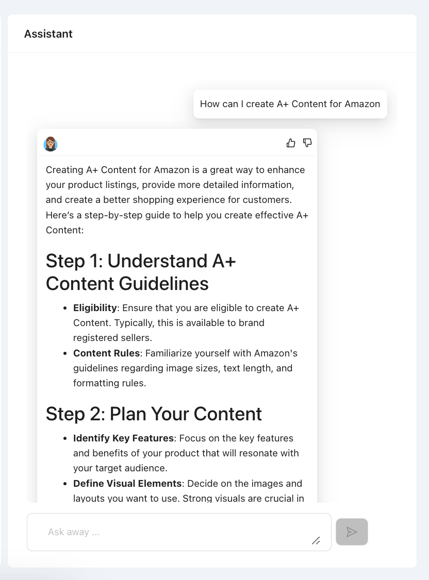
3. Chat with Emma for general Amazon insights
If you have general Amazon questions, you can use the Emma Chat to get answers. The chat is available within the emax tool and can help you with anything Amazon related.
🏷️ Tags: reference-faq · reference · key-insights · insights