
App path -> https://app.emax-digital.com/review-monitor-on-child-asin-level
Overview
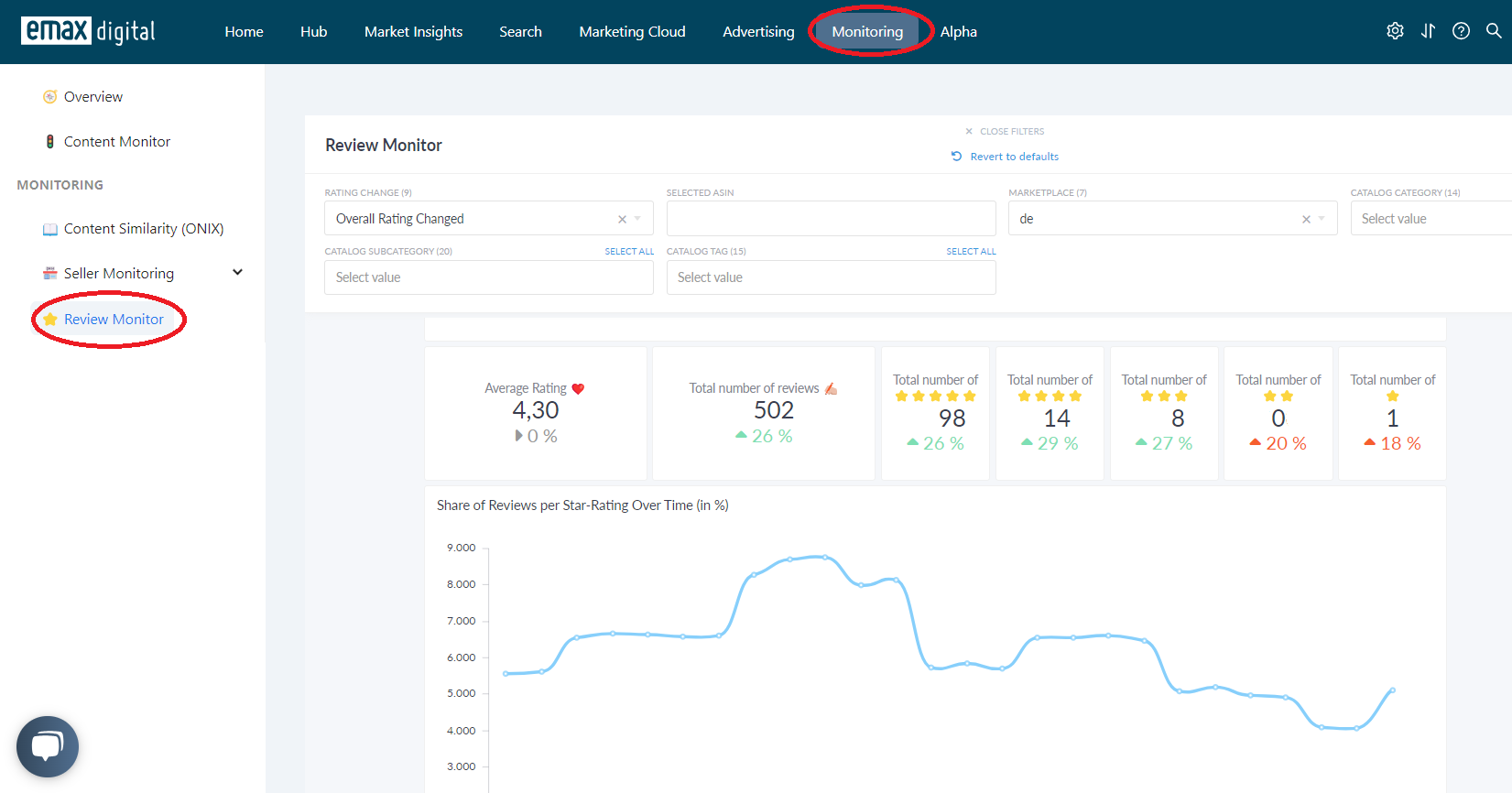
The Review Monitor – Child ASIN dashboard tracks customer reviews at the child-ASIN level across your Amazon catalogue. It shows the current average star rating, total review counts, and the share of reviews per star tier (5★ down to 1★), all compared against the previous period. The intent is operational: spot a rating shift, a spike in 1- or 2-star reviews, or a stalling review volume on a specific product before it starts affecting Buy Box performance, conversion, or ad efficiency.
It is built for brand managers, content teams, and account managers who need a daily or weekly health check on customer sentiment — and a direct path from "something changed" to "which ASIN, and what review caused it."
Amazon Vine programme (best practice): The Amazon Vine programme helps you generate honest early reviews from trusted reviewers ("Vine Voices"). Eligible products are enrolled via Amazon Seller Central; Amazon distributes them to pre-selected reviewers who publish unbiased feedback on your detail page. Typical eligibility: enrolment in Amazon Brand Registry, fewer than 30 existing reviews, an available Buy Box, and adequate stock. Vine reviews can boost credibility soon after launch and often increase product visibility. Use the Review Monitor to track how new reviews — including Vine reviews — affect your rating over time.
What You Can See on This Dashboard
The dashboard is structured in two blocks: a catalogue-level summary (KPI scorecards and a star-distribution trend chart) and a per-ASIN detail table with direct links to each review tier on Amazon.
Section 1 — Rating & Reviews Summary (Child ASIN)
Headline scorecards comparing the most recent period against the period before, so you can answer at a glance: Is the catalogue's rating moving up or down, and where in the star distribution is the movement coming from?
Key metrics:
-
Average Star Rating — Average customer star rating across all matched ASINs for the most recent day or week, with the previous period as comparison.
-
Total Number of Reviews — Sum of each ASIN's most recent review count across the catalogue.
-
Total 5-Star Reviews — Total count of 5-star reviews across all matched ASINs.
-
Total 4-Star Reviews — Total count of 4-star reviews — strongly positive sentiment, but with room for improvement.
-
Total 3-Star Reviews — Total count of 3-star (neutral) reviews. A growing share usually signals unmet expectations or inconsistent product experience.
-
Total 2-Star Reviews — Total count of 2-star reviews. An early-warning indicator of deteriorating satisfaction.
-
Total 1-Star Reviews — Total count of 1-star reviews. The strongest negative signal — often tied to quality, fulfilment, or listing-accuracy issues.
Each scorecard shows the current-period value alongside the previous-period value for a direct period-over-period read.
Section 2 — Share of Reviews per Star-Rating Over Time (in %)
A trend chart that decomposes overall sentiment into its underlying star tiers.
Visualization:
-
Line chart with one line per star tier (5★, 4★, 3★, 2★, 1★) showing the share each tier represents over time.
-
Daily view shows the last 31 days; Weekly view shows the last 8 weeks (Monday–Sunday).
Use this chart to understand whether an improving average rating is being driven by more 5-star reviews or by fewer 1-star reviews — the two have very different operational implications.
Section 3 — Details per Product (ASIN Detail Table)
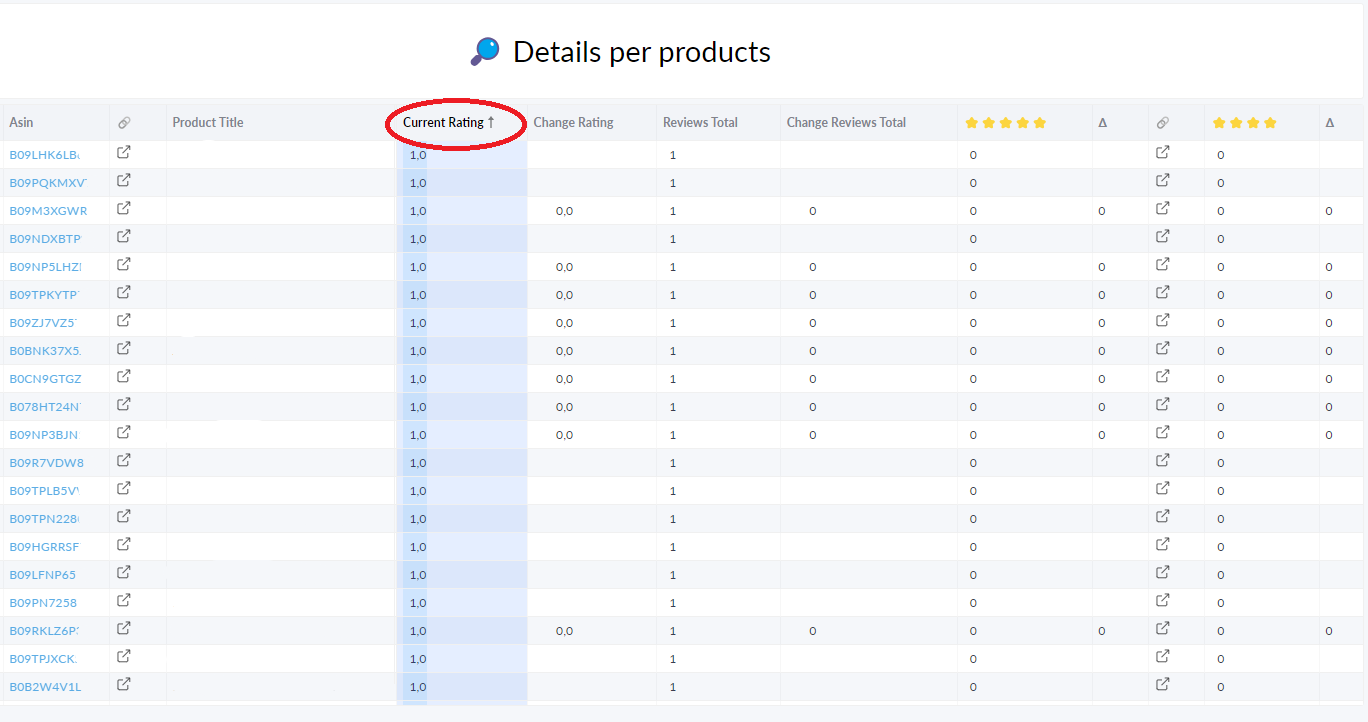
The actionable layer of the dashboard: one row per child ASIN with current rating, current review counts per star tier, and the Δ (delta) versus the previous period for each tier.
Columns shown: Image · ASIN · Marketplace · SKU · Product Title · Current Rating · Change in Rating · Reviews Total + Δ · 5★ count + Δ + 🔗 · 4★ count + Δ + 🔗 · 3★ count + Δ + 🔗 · 2★ count + Δ + 🔗 · 1★ count + Δ + 🔗.
How to read it:
-
Current Rating is shown to one decimal, matching Amazon's display precision.
-
Change in Rating is only meaningful at ±0.1 or more — Amazon does not expose finer precision.
-
Δ columns show how many reviews were gained (or lost) per star tier since the previous period.
-
🔗 link icons open the corresponding Amazon review page filtered to that star tier — you must be logged in to your Amazon account for the link to work.
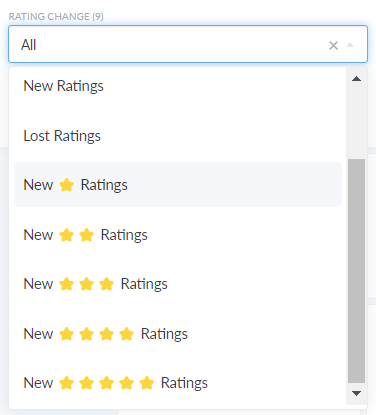
Use the Rating Change filter at the top of the dashboard to narrow the table to ASINs whose rating actually moved, or to those that gained new low-star reviews.
Available Filters
|
Filter |
What it does |
Multi-select? |
Default |
|---|---|---|---|
|
Marketplace |
Restrict the view to one Amazon marketplace (e.g. DE, UK, FR, IT, ES) |
No |
— |
|
Period |
Switch between Daily (today vs. yesterday) and Weekly (most recent completed week vs. the one before) |
No |
— |
|
Tracking in Catalog |
Filter to ASINs that are actively tracked (or inactive) in your emax digital Catalog |
No |
— |
|
Catalog Category |
Restrict to one or more of your product categories |
Yes |
All categories |
|
Catalog Sub Category |
Restrict to one or more sub-categories under the selected category |
Yes |
All subcategories |
|
ASIN |
Filter to a specific ASIN by entering it directly |
No |
All ASINs |
|
Tag |
Filter ASINs by manually assigned product tags from the Catalog |
Yes |
All tags |
|
Rating Change |
Filter the ASIN detail table to rows that meet a specific rating-change condition (e.g. rating dropped, new 1-star reviews) |
No |
All |
Filter interaction notes
-
Marketplace is linked to your company configuration — only marketplaces active for your account appear in the dropdown.
-
Catalog Sub Category depends on Catalog Category — selecting a category narrows the available subcategories.
-
Period changes the entire dashboard at once. In Daily mode, "current" = today's latest crawl and "previous" = yesterday's. In Weekly mode, weeks run Monday–Sunday and "current" = most recent completed week.
-
Rating Change primarily affects the per-ASIN detail table, letting you isolate movers from the long tail of unchanged ASINs.
Use Cases
1 — Daily review health check
You want a quick morning scan to catch any ASIN with a new bad review.
-
Set Period = Daily, Marketplace = your primary market.
-
Check the Total 1-Star Reviews and Total 2-Star Reviews scorecards for an overnight jump.
-
Set Rating Change to surface only ASINs whose rating dropped.
-
In the ASIN detail table, click the 🔗 next to a 1-star Δ to read the new review directly on Amazon and decide whether a response, a quality flag, or a listing update is needed.
2 — Investigating a drop in average rating
The catalogue-wide average rating fell this week and you need to know why.
-
Set Period = Weekly.
-
Open the Share of Reviews per Star-Rating Over Time chart and check whether the 5★ share fell, the 1★ share rose, or both.
-
Drop into the ASIN detail table and sort by Change in Rating (ascending) to find the worst movers.
-
For each top offender, use the 🔗 links to read the new negative reviews and identify a root cause (product defect, packaging, expectation mismatch, etc.).
3 — Monitoring a product launch
You launched a new ASIN and want to track review build-up.
-
Use the ASIN filter to isolate the new product.
-
Set Period = Weekly to smooth daily noise.
-
Watch the Reviews Total scorecard and the per-tier Δ columns to monitor early sentiment.
-
Compare the share of 5★ vs. 4★ in the early weeks — a low 4★/5★ ratio paired with rising 2★ reviews usually signals an expectation gap between listing copy and product reality.
4 — Category-level sentiment review
You want to know which categories in your portfolio are improving or deteriorating on sentiment.
-
Filter by Catalog Category (one at a time) and read the average rating scorecard.
-
Repeat per category to build a quick ranking; categories where 1★ and 2★ shares are growing in the trend chart should be prioritised for content, packaging, or quality reviews.
Limitations & Notes
-
Crawl-based data. Review counts and ratings come from periodic crawls of Amazon detail pages, not from a Vendor or Seller API. Very recent reviews may not appear until the next crawl completes.
-
Sums vs. Amazon's displayed total. The catalogue-level Total Reviews scorecard is the sum of each ASIN's individually crawled review count and may differ slightly from Amazon's displayed cumulative totals due to crawl timing.
-
Rating precision is limited to one decimal. Amazon calculates star ratings using machine-learned models rather than a straight average, and only exposes one decimal place. Rating changes smaller than ±0.1 are not detectable.
-
External review links require Amazon login. The 🔗 icons open Amazon's filtered review page for that star tier — you must be signed into your Amazon shopper account in the same browser for the link to load correctly.
-
Period definitions. Daily mode compares the latest crawl in the current day against the latest crawl in the previous day. Weekly mode uses Monday–Sunday weeks and compares the most recent completed week against the prior completed week — the current (incomplete) week is not shown.
-
ASINs with no crawled value count as zero. In the per-tier scorecards, ASINs without a crawl for a given period contribute zero rather than being excluded. Large changes in the active catalogue can therefore distort period-over-period comparisons.
-
Single marketplace at a time. The Marketplace filter is single-select — to compare review health across marketplaces, you need to switch the filter and read the dashboard once per market.
-
Tracking scope. Only ASINs marked as actively tracked in your Catalog are included by default. Use the Tracking in Catalog filter if you need to inspect inactive ASINs.
Data Refresh
Data updates daily. Review counts and ratings reflect the most recent crawl of each tracked ASIN's detail page.