
Customer Knowledge Base

How to download product detail page information as a Mac user

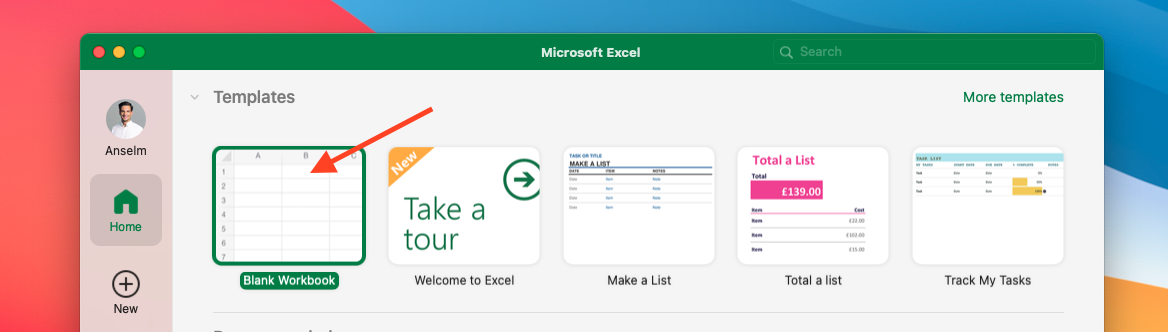
This is a manual for Mac user, how to download a csv-file with all information about the product detail pages you track and convert it into an Excel-file.

Select a time range and click on “Product Detail Page Data” to download a csv-file of the content changes on your product detail pages.

Our system fetches the data of your product detail pages on a daily basis. We recommend selecting the most recent day.
⚠️ External image — needs to be re-uploaded to Confluence

https://knowledge.emax-digital.com/hubfs/Screenshot%202021-12-10%20at%2015-09-56-png.png

Source: https://knowledge.emax-digital.com/hubfs/Screenshot%202021-12-10%20at%2015-09-56-png.png

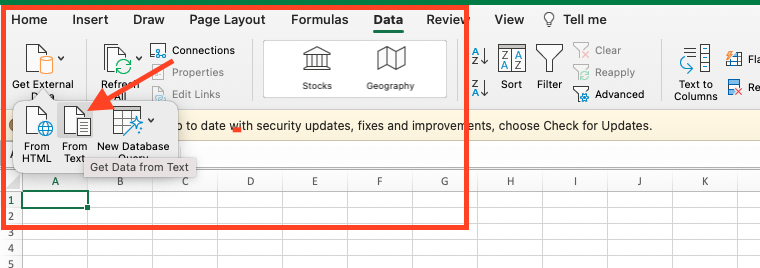
→ Navigate to “Data” → “Get External Data” → “From Text”
⚠️ External image — needs to be re-uploaded to Confluence

https://knowledge.emax-digital.com/hubfs/Screenshot%202021-12-10%20at%2015-11-46-png.png

Source: https://knowledge.emax-digital.com/hubfs/Screenshot%202021-12-10%20at%2015-11-46-png.png

Choose the respective csv-file and import the data by clicking on the green button.

⚠️ External image — needs to be re-uploaded to Confluence

https://knowledge.emax-digital.com/hubfs/Group%207%20(4)-png.png

Source: https://knowledge.emax-digital.com/hubfs/Group%207%20(4)-png.png

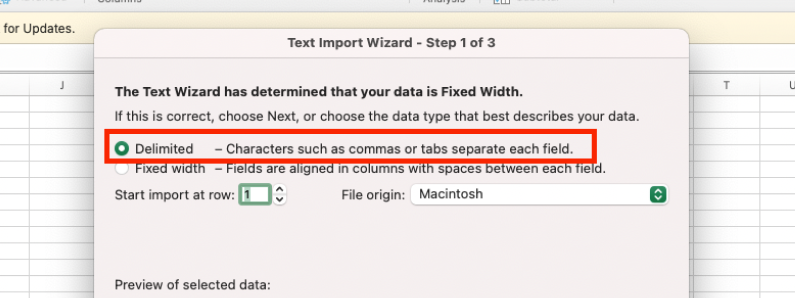
Select “Delimited” to separate each field
⚠️ External image — needs to be re-uploaded to Confluence

https://knowledge.emax-digital.com/hubfs/exportdata_2%201-png.png

Source: https://knowledge.emax-digital.com/hubfs/exportdata_2%201-png.png

Choose “Unicode (UTF-8)” as file origin

⚠️ External image — needs to be re-uploaded to Confluence

https://knowledge.emax-digital.com/hubfs/Group%207%20(10)-png.png

Source: https://knowledge.emax-digital.com/hubfs/Group%207%20(10)-png.png

Make sure to use semicolons instead of tabs

Click on “Advanced…” to set up mark as decimal separator and comma as thousands separator.

⚠️ External image — needs to be re-uploaded to Confluence

https://knowledge.emax-digital.com/hubfs/Group%207%20(7)-png.png

Source: https://knowledge.emax-digital.com/hubfs/Group%207%20(7)-png.png

Click on “Finish” to get redirected to your new xlsx. file

Make sure to format these columns as percentages!


🏷️ Tags: catalog-content · how-to · pdp