
Dashboard link: https://app.emax-digital.com/advertising-duplicate-search-key-insights
Overview
The Duplicate Search dashboard helps you stop paying twice for the same shopper. In Amazon Sponsored Products and Sponsored Brands campaigns it is easy to end up competing with yourself on the same keyword (or ASIN target) — for example a keyword targeted as exact match in a manual campaign that an auto campaign on the same ASIN also picks up, or a keyword where you already rank organically but still pay for a placement. The result: higher cost-per-click than necessary, and harder-to-interpret reporting.
This dashboard surfaces those overlaps. For each ASIN it identifies keywords that appear in more than one place and shows how much you are spending and earning on the duplicate, so you can decide which campaign should "own" the keyword and pause or negative-match the rest.
It is built for Sponsored Ads (SPA) advertising managers, and is most useful for accounts running active manual + auto campaign structures on the same products.
What counts as a "duplicate"
The dashboard surfaces two complementary kinds of duplication — both are valid and can co-exist on the same ASIN:
-
Multi-campaign keyword overlap. The same keyword (or equivalent targeting) is active on the same ASIN across more than one campaign — most commonly an auto vs. manual overlap. The Duplicate Type column then describes the kind of overlap detected.
-
Organic-Paid vs. Paid-Paid.
-
Organic-Paid — your ASIN already ranks organically for a keyword and you pay for a Sponsored Ads placement on the same keyword (partly cannibalising free traffic).
-
Paid-Paid — your ASIN appears in multiple paid placements on the same results page (e.g. a Sponsored Products result and a Sponsored Brands result), i.e. bidding against yourself.
-
What You Can See on This Dashboard
Section: Duplicate Search Overview Table
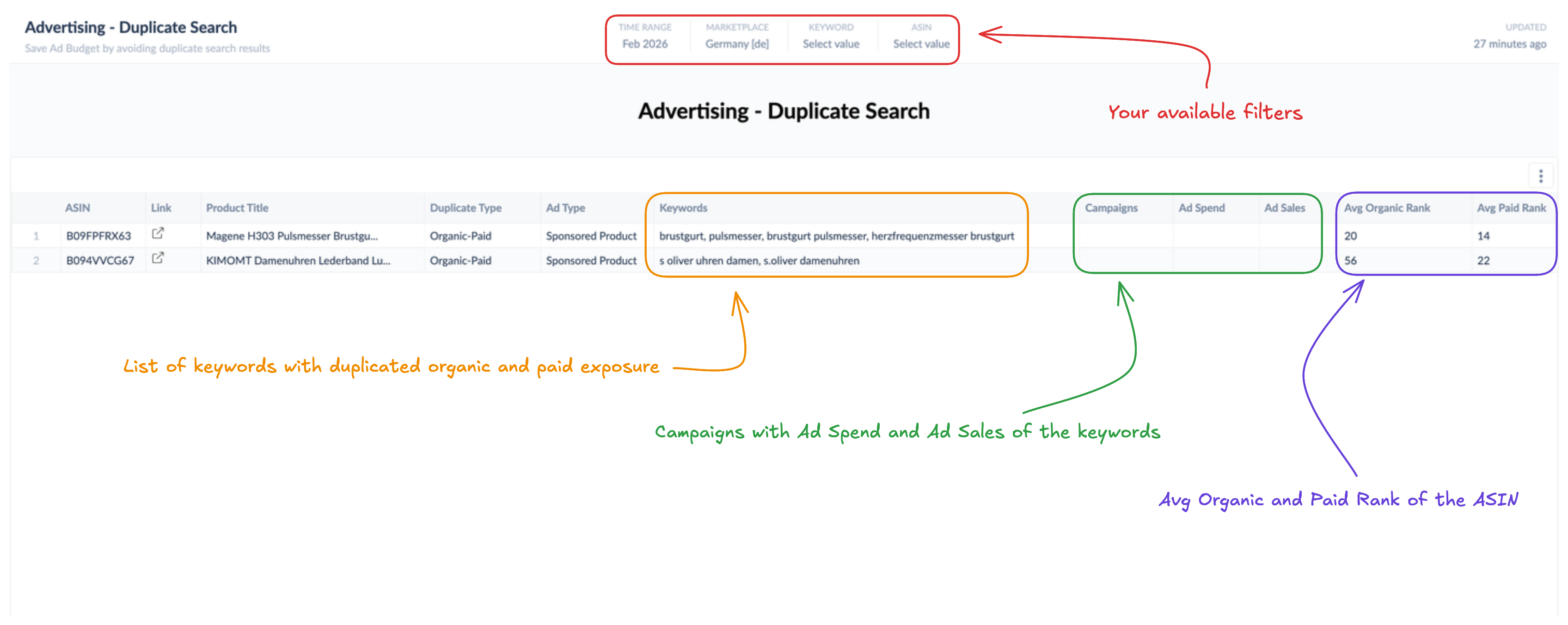
A single, sortable table is the heart of this dashboard. Each row represents an ASIN with a detected keyword duplication, along with the campaigns, ad type, spend, sales, and rank context needed to decide what to do.
Columns shown:
-
ASIN — the product affected by the duplication, with a direct link to its Amazon detail page.
-
Product Title — full product title; Title — short product title for at-a-glance scanning.
-
Duplicate Type — the kind of overlap detected (see the two kinds above — e.g. same keyword across multiple campaigns / auto-vs-manual, or Organic-Paid / Paid-Paid).
-
Ad Type — the paid placement / format involved (e.g. Sponsored Products, Sponsored Brands; in the Organic-Paid / Paid-Paid view also seen as Headline Search / Product Display / Search Carousel).
-
Keywords — the keyword(s) being duplicated for this ASIN.
-
Campaigns — the campaigns in which the duplicated keyword is active.
-
Ad Spend — total Sponsored Ads spend associated with the duplicated keyword on this ASIN over the period (the "money at risk" figure).
-
Ad Sales — total Sponsored Ads sales attributed to that duplicated keyword on this ASIN.
-
Avg Organic Rank — the average organic search rank of the ASIN for the duplicated keyword. A strong organic rank suggests you may be paying for clicks you would have earned for free. Lower numbers mean higher visibility (rank 1 = top).
-
Avg Paid Rank — the average paid placement rank for the ASIN on the duplicated keyword.
How to read it: Sort by Ad Spend descending to find the duplications costing you the most. For each high-spend row, check Avg Organic Rank — a top organic position combined with high paid spend on the same keyword is a strong signal that paid bids can be reduced. Then look at the Campaigns column to decide which campaign should keep the keyword (typically the one with better ROAS or strategic role) and which should pause or negative-match it.
Available Filters
|
Filter |
What it does |
Multi-select? |
Required |
Default |
|---|---|---|---|---|
|
Marketplace |
Restrict the view to one Amazon marketplace (e.g. DE, UK, FR) |
No |
Yes |
— |
|
ASIN |
Restrict the view to one or more ASINs of interest |
Yes |
No |
All ASINs |
|
Keyword |
Restrict the view to a specific keyword |
No |
No |
All keywords |
Filter interaction notes
-
Marketplace is mandatory. Duplicate detection is run per marketplace because campaign structures, keyword performance, and organic ranks are marketplace-specific. You must select a marketplace before the table will populate.
-
Keyword and ASIN dropdowns depend on Marketplace. Each only shows keywords / ASINs tracked (and with a detected duplicate) in the selected marketplace.
-
ASIN and Keyword filters are optional and narrow the table further. Combine them to investigate a specific product–keyword overlap (e.g. "show only the duplicates on ASIN B0XXXXXXX involving the keyword 'running shoes'").
-
The Keyword filter is single-select; the ASIN filter is multi-select.
Use Cases
1 — Cut wasted spend on high-organic-rank keywords
You suspect you are paying for clicks on keywords where you already rank well organically.
-
Set Marketplace to your target market and leave the other filters open.
-
Sort the table by Ad Spend descending (and focus on Duplicate Type = Organic-Paid).
-
Look for rows where Avg Organic Rank is strong (typically top 5) and Ad Spend is high.
-
For each, decide whether to reduce bids, lower placement modifiers, or add the keyword as a negative in the duplicating campaign.
2 — Resolve auto-vs-manual campaign conflicts
A common structural issue: a manual campaign targets a keyword as exact match while an auto campaign on the same ASIN is also matching it.
-
Filter to one or two ASINs at a time.
-
Look for rows where the Campaigns column lists both a manual and an auto campaign.
-
Keep the keyword in the manual campaign (where you control bid and match type) and add it as a negative exact in the auto campaign so the auto campaign stops competing.
3 — Find ASINs bidding against themselves (Paid-Paid)
You want to stop two paid placements competing for the same impression.
-
Select your Marketplace and focus on Duplicate Type = Paid-Paid.
-
Look at the Ad Type column — Paid-Paid duplicates typically involve a Sponsored Products result and a Sponsored Brands result, or multiple Sponsored Products placements.
-
Decide which placement to keep and pause the keyword target in the other campaign. Sponsored Brands typically work better for branded keywords; Sponsored Products for generic, high-intent ones.
4 — Prioritize advertising cleanup by financial impact
When you have limited time for portfolio hygiene work, focus on duplicates that matter financially.
-
Sort by Ad Spend descending and tackle the top 10–20 rows first.
-
Check Ad Sales as well — a duplicate with high spend and high sales may be worth keeping if both campaigns are profitable; a duplicate with high spend and low sales is a clear cleanup target.
5 — Build a weekly ad-efficiency tidy-up routine
-
Once a week, select your primary Marketplace and leave Keyword and ASIN empty so you see everything.
-
Sort by Ad Spend and review the top 20 rows; act on the highest-impact duplicates first.
Limitations & Notes
-
Sponsored Ads (SPA) only. This dashboard analyses Sponsored Products / Sponsored Brands keyword targeting. Sponsored Display, Sponsored TV, and DSP line items / audiences / product targets are not in scope.
-
Match types covered: Broad, Exact, and Phrase. Other match types are not considered for the Sponsored Products side of the duplicate check.
-
Keywords must be tracked. A duplicate is only detected if the keyword is tracked in emax digital for the selected marketplace. Untracked search terms will not appear even if you are bidding on them — check your tracked keyword list if something expected is missing.
-
Marketplace is single-select and required. To compare duplicates across markets, run the dashboard once per marketplace; the table does not aggregate across marketplaces.
-
Ranks are averages. Avg Organic Rank and Avg Paid Rank are averages over all the days a duplicate was active in the selected range; a single very good or very bad day can pull the average. For sensitive decisions, narrow the time range.
-
Spend/Sales attribution. Ad Spend and Ad Sales reflect Amazon's standard 14-day click-attribution window for Sponsored Ads. Recently-closed periods may still update slightly as Amazon finalizes attribution.
-
Currency. Ad Spend and Ad Sales are shown in the marketplace's original currency; there is no global currency conversion on this dashboard.
-
Action required outside the dashboard. Duplicate Search highlights overlaps but does not pause campaigns or push negatives back to Amazon Ads. Resolutions must be applied in Amazon Ads Console (or your bid-management tool).
Data Refresh
Data updates daily.